Delta Dev POS দিয়ে সম্পূর্ণ সেল প্রসেস কীভাবে কাজ করে?
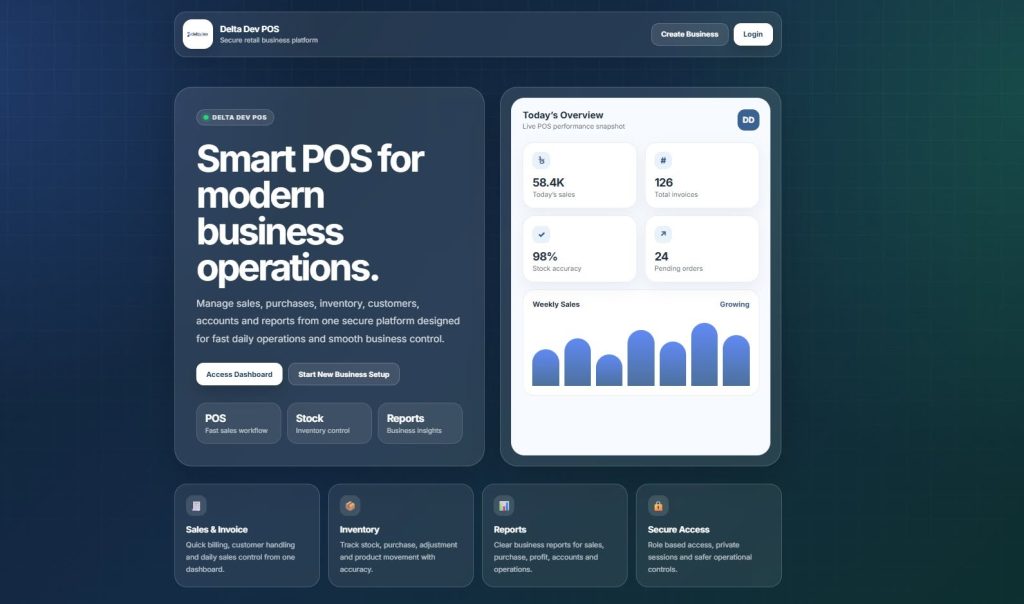
ব্যবসা পরিচালনার সবচেয়ে গুরুত্বপূর্ণ অংশ হলো সঠিকভাবে সেল ম্যানেজমেন্ট। একটি sale শুধু product বিক্রি করার বিষয় না—এর সাথে stock update, customer tracking, payment management, invoice generation, due calculation, cash register, report এবং profit analysis সবকিছু জড়িত।
Delta Dev POS এমনভাবে তৈরি করা হয়েছে যাতে একজন cashier বা business owner খুব সহজে product sale করতে পারে এবং system automatically সব হিসাব update করে দেয়।
এই পোস্টে আমরা দেখবো, Delta Dev POS-এ শুরু থেকে শেষ পর্যন্ত একটি sale কীভাবে complete হয়।
Delta Dev POS কী?
Delta Dev POS হলো একটি modern POS and Business Management Software, যা retail shop, wholesale business, pharmacy, fashion store, electronics shop, hardware store, restaurant, stationery, salon, repair shop এবং multi-branch business-এর জন্য ব্যবহার করা যায়।
এই system দিয়ে আপনি একসাথে manage করতে পারবেন:
- Sales
- Purchase
- Inventory / Stock
- Customer
- Supplier
- Invoice
- Payment
- Due
- Expense
- Cash Register
- Reports
- Barcode
- Thermal Receipt Printing
এক কথায়, এটি একটি complete business automation solution.
1. User Login দিয়ে Sales Process শুরু হয়
প্রথমে authorized user system-এ login করে।
User হতে পারে:
- Admin
- Cashier
- Manager
- Salesperson
- Custom Role User
Login করার পর system check করে user-এর permission আছে কিনা।
যদি user-এর POS access বা sell permission থাকে, তাহলে সে sale screen ব্যবহার করতে পারে।
এতে business owner সহজেই control করতে পারেন কে sale করবে, কে report দেখবে, কে product add করবে, কে payment manage করবে।
2. Cash Register Open করা
POS sale শুরু করার আগে cashier cash register open করতে পারে।
এখানে opening cash amount দেওয়া যায়।
Example:
Opening Cash: 5,000 BDTএরপর ঐ cashier-এর সব sale, cash payment, card payment, due payment এবং register closing report system track করে।
Cash register-এর মাধ্যমে দেখা যায়:
- Total cash sale
- Card sale
- Due sale
- Expense
- Cash in hand
- Closing balance
- Cashier-wise sales summary
এটি shop management-এর জন্য খুবই গুরুত্বপূর্ণ, কারণ দিনের শেষে cash mismatch সহজেই identify করা যায়।
3. POS Sale Screen Open করা
Cashier POS screen open করলে sale করার জন্য প্রয়োজনীয় interface দেখা যায়।
সাধারণত POS screen-এ থাকে:
- Customer select option
- Product search field
- Barcode scan input
- Product cart
- Quantity update option
- Discount option
- Tax / VAT option
- Payment section
- Invoice print option
- Draft / Final sale option
Default ভাবে system-এ Walk-In Customer select থাকতে পারে।
মানে customer details না থাকলেও quick sale করা যায়।
4. Customer Select অথবা New Customer Add
Sale করার সময় cashier চাইলে existing customer select করতে পারে।
Customer না থাকলে POS screen থেকেই নতুন customer add করা যায়।
Customer select করলে system পরবর্তীতে track করতে পারে:
- Customer purchase history
- Customer due
- Customer payment
- Customer ledger
- Customer contact information
- Customer-wise sales report
যেসব business credit sale বা due sale করে, তাদের জন্য customer tracking খুবই গুরুত্বপূর্ণ।
5. Product Add করা
Delta Dev POS-এ product add করার কয়েকটি সহজ পদ্ধতি আছে।
Product Name দিয়ে Search
Cashier product search box-এ product name লিখলে system matching product দেখায়।
Product select করলে cart-এ add হয়।
SKU অথবা Barcode দিয়ে Search
Product-এর SKU বা barcode system-এ save করা থাকলে barcode scanner দিয়ে scan করলেই product automatically cart-এ add হয়।
Barcode scanner সাধারণত keyboard-এর মতো কাজ করে।
Scanner barcode read করে POS input field-এ value পাঠায়, তারপর system সেই value দিয়ে product খুঁজে cart-এ add করে।
Flow:
Barcode Scan
→ SKU/Sub-SKU Search
→ Product Found
→ Product Added to Cart
Featured Product থেকে Add
Fast selling product বা popular product POS screen-এ button আকারে রাখা যায়।
Cashier click করলেই product cart-এ add হয়।
6. Stock Availability Check
Product cart-এ add করার সময় system stock check করে।
System verify করে:
- Product active কিনা
- Product selling allowed কিনা
- Selected branch/location-এ stock আছে কিনা
- Product variation ঠিক আছে কিনা
- Stock manage enabled কিনা
- Required quantity available আছে কিনা
Stock না থাকলে system warning দিতে পারে।
এতে overselling, stock mismatch এবং inventory error কমে যায়।
7. Product Cart Calculation
Product cart-এ add হলে system line-wise calculation করে।
প্রতিটি product line-এ থাকে:
- Product name
- Variation
- Quantity
- Unit price
- Discount
- Tax
- Subtotal
Example:
Product Price: 500 BDT
Quantity: 2
Subtotal: 1,000 BDT
Discount: 50 BDT
Line Total: 950 BDT
Quantity বাড়ালে বা কমালে system automatically total update করে।
8. Discount Apply করা
Delta Dev POS-এ discount দুইভাবে apply করা যায়।
Product Line Discount
নির্দিষ্ট product-এর উপর discount দেওয়া যায়।
Example:
Product A = 5% DiscountOrder Level Discount
সম্পূর্ণ invoice-এর উপর discount দেওয়া যায়।
Example:
Invoice Total: 5,000 BDT
Discount: 200 BDT
Payable: 4,800 BDT
এতে campaign, regular customer discount বা special offer সহজে manage করা যায়।
9. VAT / GST / Custom Tax Apply
Business অনুযায়ী tax configure করা যায়।
Supported tax type হতে পারে:
- VAT
- GST
- Custom Tax
- Group Tax
- No Tax
Tax product-wise অথবা invoice-wise apply করা যায়।
পরে tax report থেকে নির্দিষ্ট সময়ের input/output tax দেখা যায়।
বাংলাদেশের business-এর জন্য VAT management একটি গুরুত্বপূর্ণ feature, তাই POS system-এ customizable tax support থাকা দরকার।
10. Shipping বা Additional Charge Add
কিছু sale-এর ক্ষেত্রে shipping charge, service charge বা additional cost থাকতে পারে।
Example:
Subtotal: 5,000 BDT
Shipping Charge: 100 BDT
Discount: 200 BDT
Final Payable: 4,900 BDT
Delta Dev POS এই ধরনের additional charge হিসাবের মধ্যে include করতে পারে।
11. Final Payable Amount Calculate
সব product, discount, tax, shipping এবং rounding হিসাব করে final payable amount তৈরি হয়।
Calculation flow:
Product Subtotal
- Discount
+ Tax
+ Shipping Charge
+ Additional Charge
+/- Rounding
= Final Payable Amount
Example:
Subtotal: 5,000 BDT
Discount: 200 BDT
Tax: 0
Shipping: 100 BDT
Final Payable: 4,900 BDT
এই calculation automatically হয়, তাই manual error হওয়ার chance কমে যায়।
12. Payment Receive করা
Sale complete করার আগে payment method select করা হয়।
Delta Dev POS-এ বিভিন্ন ধরনের payment method support করা যায়:
- Cash
- Card
- Bank Transfer
- Cheque
- Mobile Banking
- Custom Payment
- Due / Credit Sale
- Multiple Payment Method
Example:
Total Payable: 5,000 BDT
Cash: 3,000 BDT
Card: 2,000 BDT
Paid: 5,000 BDT
Due: 0
অথবা partial payment হলে:
Total Payable: 5,000 BDT
Paid: 3,000 BDT
Due: 2,000 BDT
Due sale হলে customer ledger-এ due amount automatically update হয়।
13. Change Return Calculation
Customer যদি payable amount-এর বেশি cash দেয়, system change return calculate করে।
Example:
Payable: 850 BDT
Customer Paid: 1,000 BDT
Change Return: 150 BDT
এতে cashier দ্রুত ও accurate ভাবে customer-কে change দিতে পারে।
14. Sale Status: Draft, Quotation, Suspended অথবা Final
Delta Dev POS-এ sale বিভিন্ন status-এ save করা যায়।
Final Sale
এটি actual completed sale।
Final sale করলে stock কমে যায়, payment save হয় এবং invoice generate হয়।
Draft Sale
Sale temporary save করে রাখা যায়।
পরে edit করে final করা যায়।
Quotation
Customer-কে quotation দেওয়া যায়।
এতে stock reduce হয় না।
Suspended Sale
Sale hold করে রাখা যায়।
Restaurant, retail counter বা multi-customer situation-এ এটি useful।
15. Sale Submit করার পর System কী করে?
Cashier যখন sale final করে, system background-এ অনেক গুরুত্বপূর্ণ কাজ automatically complete করে।
System সাধারণত:
- Main sale transaction create করে
- Invoice number generate করে
- Product sell lines save করে
- Payment information save করে
- Stock reduce করে
- Customer due/balance update করে
- Cash register update করে
- Account/payment record update করে
- Invoice print data prepare করে
- Sales report update করে
এতে cashier শুধু sale complete করে, বাকি হিসাব system নিজে maintain করে।
16. Database Level-এ Sale Data কীভাবে Save হয়?
Sale complete হলে system master এবং details আকারে data save করে।
Transaction Data
এখানে sale-এর main information থাকে:
- Invoice number
- Customer
- Business
- Location
- Sale date
- Final total
- Discount
- Tax
- Payment status
- Sale status
- Created by user
Product Line Data
এখানে কোন product কত quantity sell হয়েছে তা থাকে:
- Product ID
- Variation ID
- Quantity
- Unit price
- Discount
- Tax
- Line total
Payment Data
এখানে payment details থাকে:
- Payment method
- Paid amount
- Payment date
- Account
- Card/Cheque/Bank info
Stock Update
Sale final হলে stock automatically কমে যায়।
Example:
Previous Stock: 100 pcs
Sold Quantity: 2 pcs
New Stock: 98 pcs
17. Invoice Generate এবং Print
Sale complete হলে invoice generate হয়।
Invoice-এ থাকতে পারে:
- Business name
- Branch/location address
- Invoice number
- Customer name
- Date and time
- Product list
- Quantity
- Unit price
- Discount
- VAT/tax
- Total amount
- Paid amount
- Due amount
- Payment method
- Footer note
Business চাইলে invoice layout customize করতে পারে।
18. Barcode Scanner দিয়ে Faster Sale
Delta Dev POS barcode scanner support করে, যা fast billing-এর জন্য খুব helpful।
Barcode sale process:
Product SKU/Barcode Save
→ Barcode Label Print
→ POS Screen Open
→ Barcode Scan
→ Product Auto Search
→ Product Cart-এ Add
→ Payment
→ Invoice Print
Barcode scanner support থাকায়:
- Billing speed বাড়ে
- Product search time কমে
- Manual typing কমে
- Wrong product selection কম হয়
- Cashier দ্রুত sale complete করতে পারে
Standard USB barcode scanner keyboard mode-এ থাকলে POS sale screen-এ সহজেই কাজ করে।
19. Thermal Receipt Printer Support
Delta Dev POS ESC/POS compatible thermal receipt printer support করতে পারে।
Receipt print করা যায়:
- Browser print দিয়ে
- Thermal printer দিয়ে
- Network/USB printer configuration অনুযায়ী
Retail shop, pharmacy, grocery, restaurant, super shop—সব জায়গায় thermal receipt printer professional billing experience তৈরি করে।
20. Sale Complete হওয়ার পর Report Update
Sale complete হলে data automatically report section-এ reflect করে।
Business owner দেখতে পারে:
- Daily sales report
- Product sell report
- Cash register report
- Customer due report
- Stock report
- Profit/loss report
- Tax report
- Trending product report
- Sales representative report
এই reports business decision নিতে সাহায্য করে।
21. একটি Practical Sale Example
ধরা যাক একজন customer দুটি product কিনলো।
Product A: 2 pcs × 500 = 1,000 BDT
Product B: 1 pcs × 300 = 300 BDT

Subtotal = 1,300 BDT
Discount = 100 BDT
VAT = 0
Final Payable = 1,200 BDT
Customer Paid = 1,200 BDT
Due = 0
System automatically:
- Invoice create করবে
- Product A stock 2 কমাবে
- Product B stock 1 কমাবে
- Payment save করবে
- Cash register update করবে
- Sales report update করবে
- Customer ledger update করবে
- Receipt print করবে
কেন Delta Dev POS Sales Process ব্যবসার জন্য গুরুত্বপূর্ণ?
একটি smart POS system শুধু billing করে না; এটি পুরো business operation control করে।
Delta Dev POS ব্যবহারের সুবিধা:
- দ্রুত sale complete করা যায়
- Stock automatically update হয়
- Due tracking সহজ হয়
- Invoice professional হয়
- Cash register control থাকে
- Manual calculation error কমে
- Report থেকে business performance বোঝা যায়
- Multiple branch manage করা যায়
- Barcode scanner দিয়ে billing speed বাড়ে
- Customer ও supplier ledger maintain হয়
কোন Business-এর জন্য Delta Dev POS Suitable?
Delta Dev POS ব্যবহার করা যায়:
- Retail Shop
- Wholesale Business
- Grocery Store
- Super Shop
- Pharmacy
- Fashion Store
- Electronics Shop
- Mobile Shop
- Hardware Store
- Restaurant
- Stationery Shop
- Salon & Spa
- Repair Shop
- Department Store
- Multi-Branch Business
Conclusion
একটি business-এর sales process যদি manual হয়, তাহলে ভুল হিসাব, stock mismatch, due tracking problem এবং report management কঠিন হয়ে যায়।
Delta Dev POS sale process-কে সহজ, দ্রুত, accurate এবং professional করে।
Product search বা barcode scan থেকে শুরু করে payment, invoice print, stock update, cash register, customer ledger এবং report—সবকিছু একসাথে connected ভাবে কাজ করে।
আপনার business যদি automation, accuracy এবং growth-এর দিকে নিতে চান, তাহলে Delta Dev POS হতে পারে একটি cost-effective এবং powerful solution.
📌 Start smart. Sell faster. Manage better. Grow confidently.
📞 Demo, pricing বা subscription জানতে যোগাযোগ করুন।
🌐 Website: https://deltadev.com.bd/